React Native Blur
Backdrop blur and frosted glass for React Native and Expo, on iOS and Android. Blur what is behind headers, tab bars, cards, popups and buttons while their content stays sharp, or blur a whole screen or a playing video.
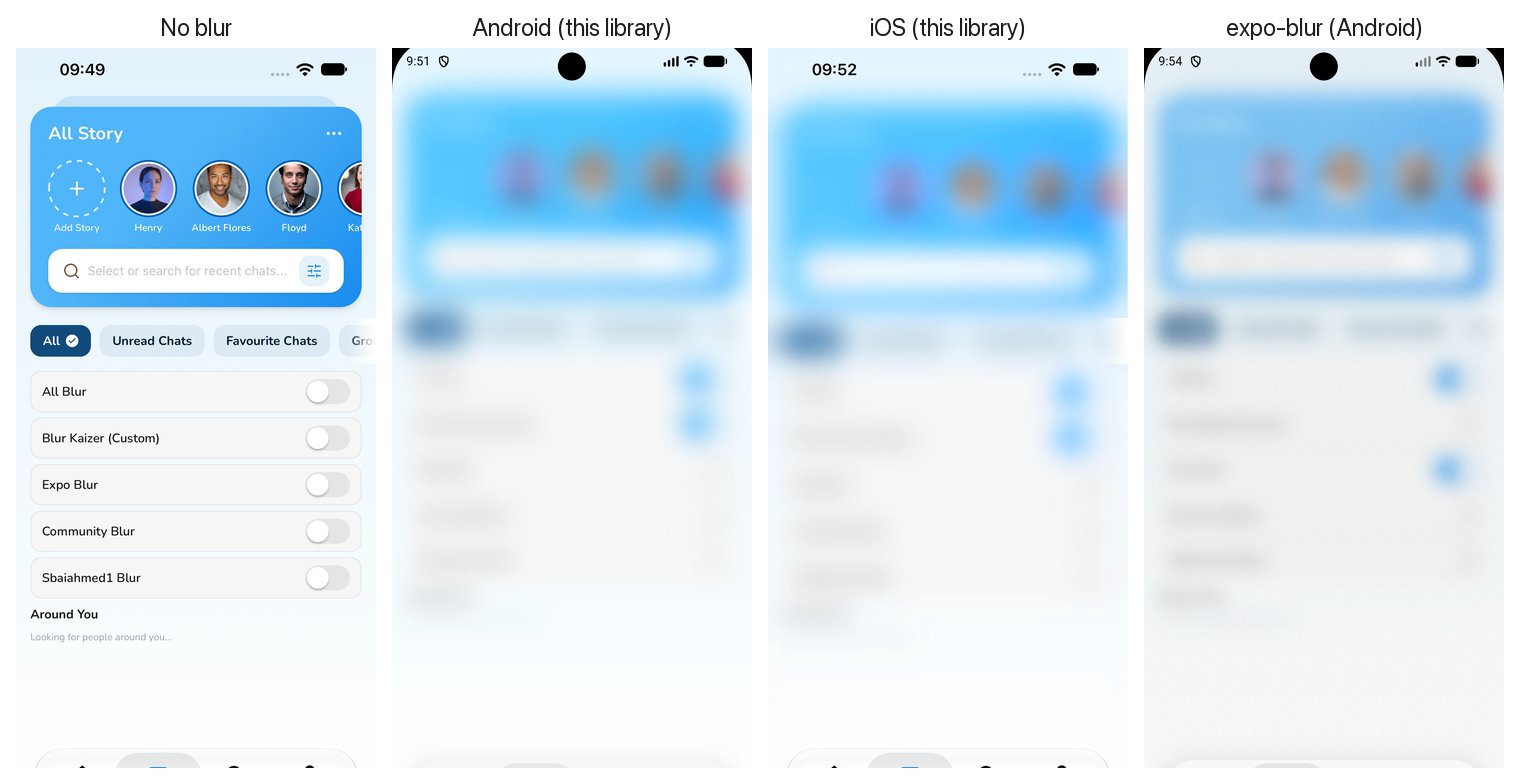
Features
- Backdrop blur (
mode="backdrop"): frosted headers, tab bars, cards, popups and buttons that blur whatever is behind them, with sharp content on top. Works over scrolling lists and playing video. - Blurs video on Android, including
SurfaceViewplayers such asexpo-videoandreact-native-video. - Real iOS materials:
UIVisualEffectViewwith the system blur styles. - Android matched to iOS: a
RenderEffectblur plus colour matrix per material, calibrated against iOS screenshots (mean error 1.95 / 255 across 187 sampled colours). - One
intensityprop from 0 to 100 drives blur, colour and glass rim together. - Web fallback with CSS
backdrop-filter. - React Native CLI and Expo: a native Fabric component with no JS dependencies and no Expo requirement.
Installation
React Native CLI
npm install @nguyenduy1412/react-native-blur
cd ios && pod install
Rebuild the app. Autolinking picks the library up; no Expo packages are needed.
Expo
npx expo install @nguyenduy1412/react-native-blur
npx expo run:ios
npx expo run:android
It contains native code, so it does not run in Expo Go. Use a development build or EAS Build.
Requirements
| Minimum | |
|---|---|
| React Native | 0.76 with the New Architecture (Fabric). Tested with React Native 0.86. |
| iOS | 15.1 |
| Android | API 31 (Android 12) for the blur. Older versions draw a translucent material plate. |
| Expo (optional) | Tested with Expo SDK 57 |
Quick start
| You want to blur… | Use |
|---|---|
| What is behind the view (header, tab bar, card, popup, button) | mode="backdrop" |
| What is inside the view (a whole screen, an image, a playing video) | mode="content" (default) |
import BlurView from "@nguyenduy1412/react-native-blur";

<BlurView mode="backdrop" intensity={80} tint="systemThinMaterial" style={{ borderRadius: 24, padding: 16 }}>
  <Text>Frosted card</Text>
</BlurView>

<BlurView style={{ flex: 1 }} intensity={50} tint="systemMaterial">
  <YourContent />
</BlurView>
Guides
- Frosted glass header and tab barSticky headers and floating tab bars that blur the list scrolling under them.
- Blur a video on AndroidWhy video stays sharp under most blur libraries, and how to blur it.
- Blurred modal backgroundBlur the screen behind a modal, bottom sheet or popup.
- expo-blur alternativeHow this library compares with expo-blur and @react-native-community/blur.
- Common blur issues and fixesVideo stays sharp, grey Android blur, Modal, New Architecture crashes and more.
API
<BlurView /> accepts every View prop, plus:
| Prop | Type | Default | Platforms | Description |
|---|---|---|---|---|
mode | 'content' | 'backdrop' | 'content' | iOS, Android | 'backdrop' blurs what is behind the view and keeps its children sharp. 'content' blurs the children. |
intensity | number | 50 | iOS, Android, Web | Strength of the whole effect, 0 to 100. 0 disables it. |
tint | BlurTint | 'default' | iOS, Android, Web | Material to use. See below. |
tintColor | ColorValue | — | iOS, Android, Web | Extra colour layer over the blur, e.g. 'rgba(0,0,0,0.3)'. |
borderRadius | number | style.borderRadius or 0 | iOS, Android | Corner radius for blur, tint and rim. |
blurRadius | number | from tint | Android, Web | Overrides the material's blur radius, in dp. |
saturation | number | 1 | Android, Web | Multiplier on the material's saturation boost. |
tint values
tint | iOS style | Android |
|---|---|---|
'default' | .regular | Light or dark material following the system theme |
'light' | .light | Light material |
'extraLight' | .extraLight | Extra light material |
'dark' | .dark | Dark material |
'prominent' | .prominent | Extra light in light mode, dark in dark mode |
'systemUltraThinMaterial' | .systemUltraThinMaterial | Ultra-thin material, light or dark |
'systemThinMaterial' | .systemThinMaterial | Thin material, light or dark |
'systemMaterial' | .systemMaterial | Regular material, light or dark |
'systemThickMaterial' | .systemThickMaterial | Thick material, light or dark |
'systemChromeMaterial' | .systemChromeMaterial | Chrome material, light or dark |
How it works
iOS. A UIVisualEffectView with the matching UIBlurEffect style sits over the children in content mode and underneath them in backdrop mode. intensity scrubs a paused UIViewPropertyAnimator, so every value is a real system blur rather than an opacity fade.
Android (API 31+). A RenderEffect chain applies a Gaussian blur, then a ColorMatrix that restores the brightness and saturation the blur removes and lays down the material's tint. The numbers come from Apple's own material recipes and are checked against colours sampled from iOS screenshots.
Video on Android. SurfaceViews inside the view are copied with PixelCopy (downscaled 4×, about 30 fps) and drawn in place, where the blur applies to them like everything else.
Backdrop on Android. The view records what is drawn behind it (ancestor backgrounds and earlier siblings, with scroll offsets and transforms) into a RenderNode, blurs it, and draws the children on top. It refreshes on every frame where something changed.
Web. CSS backdrop-filter: blur() saturate() with a tint background.
Limitations
- Android 11 and below have no
RenderEffect, so they draw a translucent material plate instead of a blur. blurRadiusandsaturationare ignored on iOS.- Backdrop inside
<Modal>on Android copies the screen behind withPixelCopyat about 30 fps, half resolution. - Backdrop mode on Android cannot see a
SurfaceViewbehind it. Use aTextureViewvideo (surfaceType="textureView"in expo-video). Content mode blursSurfaceViewvideo fine.
FAQ
How do I make a frosted header, tab bar or button in React Native?
Use <BlurView mode="backdrop">. The content behind the view is blurred and its children stay sharp, on both iOS and Android.
Why does my BlurView show only a tint on Android?
A BlurView laid over other views needs mode="backdrop"; the default mode="content" blurs only its own children. The device must also run Android 12 (API 31) or later.
Does it work in Expo Go?
No. The package contains native code, so it needs a development build (npx expo run:ios / npx expo run:android) or EAS Build. React Native CLI apps work after pod install and a rebuild.
Does it work without Expo?
Yes. Since 2.0 it is a plain React Native Fabric component, so a React Native CLI app only needs npm install and pod install.
Which Android versions get a real blur?
Android 12 (API 31) and later, where RenderEffect exists. Android 11 and earlier draw a translucent material plate without blur, so content stays readable.
Does it support the New Architecture?
Yes, and it requires it. It is a Fabric native component generated with React Native Codegen, tested with React Native 0.86 and Expo SDK 57.